磁盘分区
目标
理解逻辑卷使用的规则
名词解释
- 磁盘分区
首先将物理磁盘转换成物理卷,然后把物理卷整合称为卷组,最后把物理卷的空间创建成虚拟卷面积可以
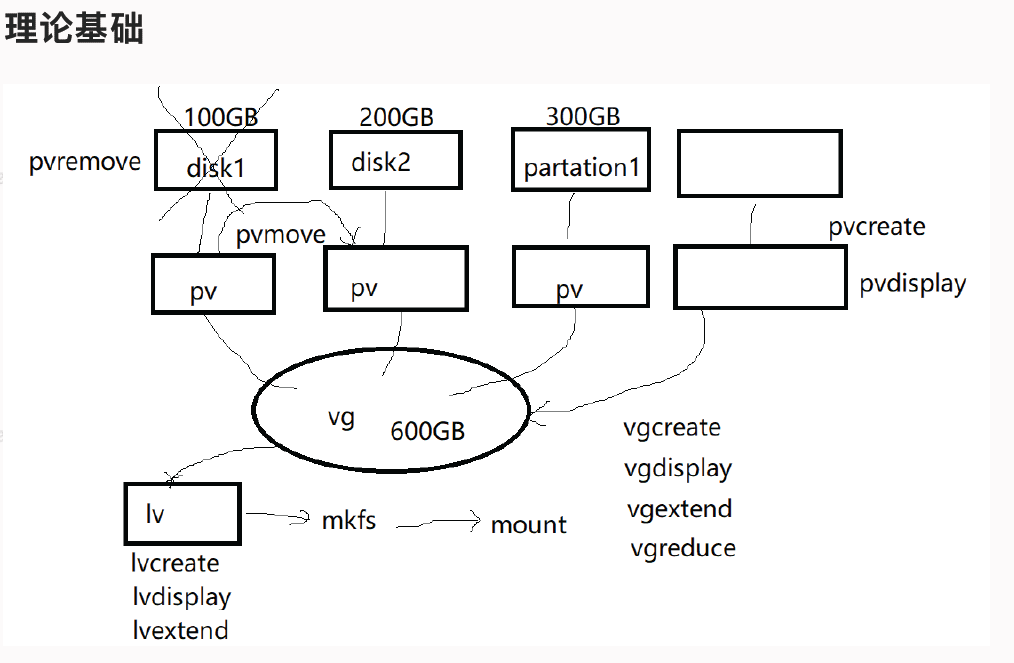
lvm
- 创建逻辑分区
[root@localhost ~]# parted /dev/sdd
GNU Parted 3.1
使用 /dev/sdd
Welcome to GNU Parted! Type 'help' to view a list of commands.
(parted) mkpart
分区名称?  []? pv
文件系统类型?  [ext2]? ^C
错误: 需要文件系统类型。
(parted) p
Model: VMware, VMware Virtual S (scsi)
Disk /dev/sdd: 21.5GB
Sector size (logical/physical): 512B/512B
Partition Table: gpt
Disk Flags:

Number  Start   End     Size    File system     Name     标志
 1      1049kB  2048MB  2047MB  linux-swap(v1)  primary

(parted) mkpart
分区名称?  []? primary
文件系统类型?  [ext2]?
起始点? 2049MB
结束点? 4096MB
(parted) p
Model: VMware, VMware Virtual S (scsi)
Disk /dev/sdd: 21.5GB
Sector size (logical/physical): 512B/512B
Partition Table: gpt
Disk Flags:

Number  Start   End     Size    File system     Name     标志
 1      1049kB  2048MB  2047MB  linux-swap(v1)  primary
 2      2049MB  4096MB  2047MB                  primary

(parted) mkpart primary xfs 4096MB 6114MB
(parted) p
Model: VMware, VMware Virtual S (scsi)
Disk /dev/sdd: 21.5GB
Sector size (logical/physical): 512B/512B
Partition Table: gpt
Disk Flags:

Number  Start   End     Size    File system     Name     标志
 1      1049kB  2048MB  2047MB  linux-swap(v1)  primary
 2      2049MB  4096MB  2047MB                  primary
 3      4096MB  6114MB  2019MB                  primary

(parted) help set
  set NUMBER FLAG STATE                    change the FLAG on partition NUMBER

    NUMBER is the partition number used by Linux.  On MS-DOS disk labels, the primary partitions number from 1 to 4,
        logical partitions from 5 onwards.
        “标志”是以下任意一项:启动, 根, 对换分区, 隐藏分区, raid, lvm, lba, hp-service, palo, prep, msftres, bios_grub, atvrecv, diag,
        legacy_boot
        状态为:开、关
(parted) set 2 lvm on
(parted) set 3 lvm on
(parted) p
Model: VMware, VMware Virtual S (scsi)
Disk /dev/sdd: 21.5GB
Sector size (logical/physical): 512B/512B
Partition Table: gpt
Disk Flags:

Number  Start   End     Size    File system     Name     标志
 1      1049kB  2048MB  2047MB  linux-swap(v1)  primary
 2      2049MB  4096MB  2047MB                  primary  lvm
 3      4096MB  6114MB  2019MB                  primary  lvm

(parted) quit
信息: You may need to update /etc/fstab.
文档更新时间: 2022-11-10 16:53 作者:xiubao yan